How To Batch-Create 30 Days Of Social Media Content For SMBs
Keeping up with social media every day is one of the fastest ways to burn through the time you don't have. For small and medium business owners running lean teams, the daily scramble to post something, anything, pulls focus away from the work that actually drives revenue. Batch creation solves this by collapsing a full month of content into one focused afternoon, replacing the daily grind with a repeatable system that keeps your brand visible without constant attention.
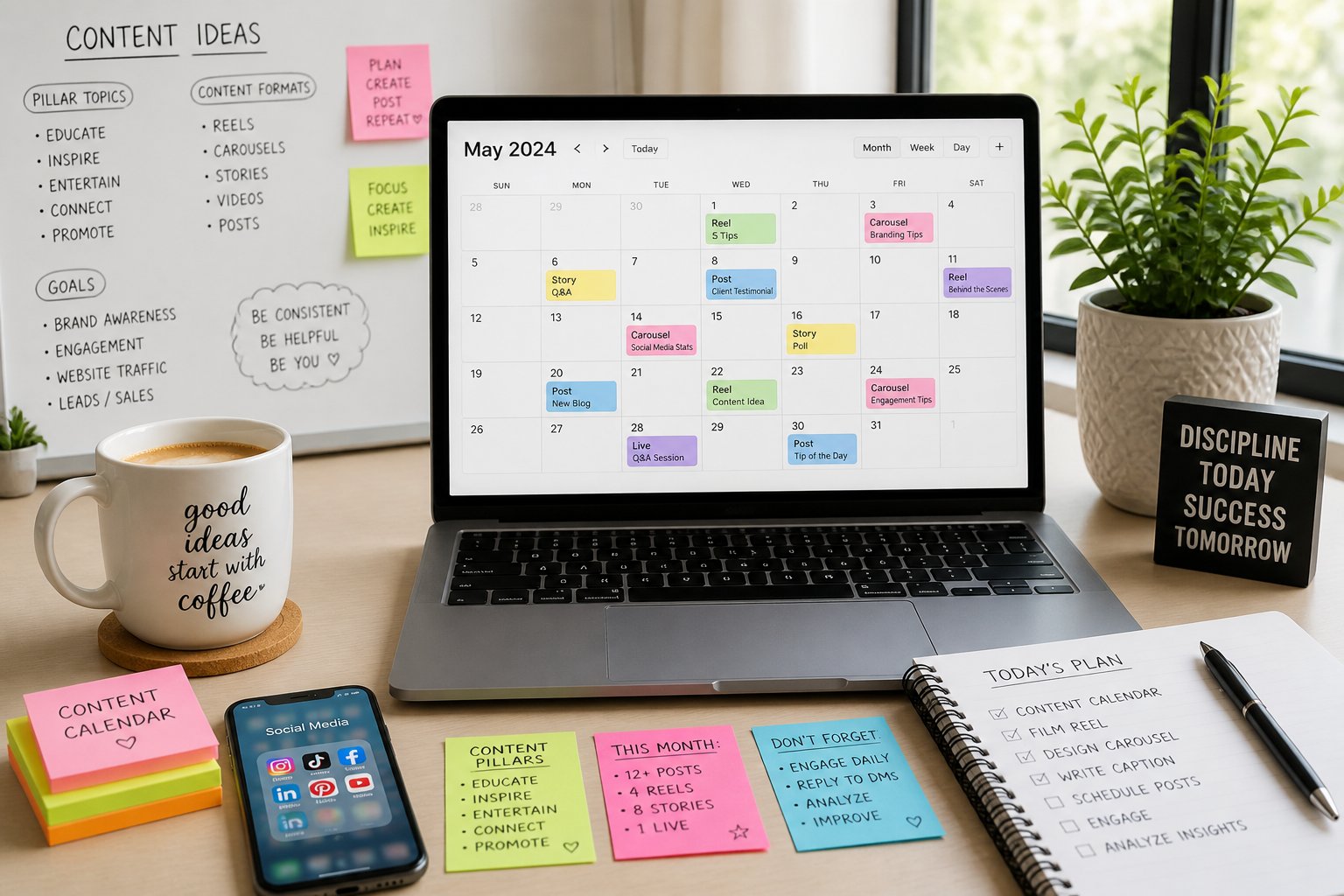
The workflow is straightforward: define your content pillars, build a repeating content grid, generate ideas in bulk, create visual assets from templates, and schedule everything in a single session. The time savings are real. Marketers who batch content report being significantly more consistent on social media than those who create posts on the fly.
Service brands, finance-adjacent businesses, and any company that needs to build trust before a sale benefit most from this approach. A brand focused on flexible loan options for small and medium businesses, for example, has deep expertise around funding, cash flow, and growth that can fuel dozens of valuable posts without repeating the same message twice.
Start by applying to CoreRate Preferred Funding's free, no-obligation platform if you're looking to pair your content growth with access to real capital. The two move together better than most owners expect.
Key Takeaways
-
A 7-day repeating content grid removes daily decision-making and keeps your posting schedule consistent across a full month.
-
One strong core idea, such as a blog post or FAQ, can be repurposed into enough formats to fill weeks of content without having to start from scratch.
-
AI tools and pre-built Canva templates compress the production phase, so scheduling, analytics review, and the next batch all flow from the same organized session.
Start With A 30-Day Plan That Removes Daily Guesswork.
A solid content strategy before your batch session is what separates a productive afternoon from a frustrating one. Four content pillars mapped onto a simple 7-day repeating grid give you a full 30-day content calendar without having to make creative decisions on the fly every time you sit down to post.
Choose Four Content Pillars That Match Business Goals
Content pillars are the recurring themes your posts orbit around. For a service-based SMB, four pillars work well: educational content, social proof, behind-the-scenes or personal, and promotional content.
Each pillar should connect directly to a business goal. Education builds trust and positions you as an authority. Social proof converts browsers into buyers. Behind-the-scenes content builds relationship equity. Promotional posts drive direct action. Keep pillar definitions tight so content stays focused,d and your content mix doesn't drift into random territory.
Build A 7-Day Repeating Content Grid.
A 7-day repeating content grid assigns each day of the week a content type from your pillars. For example: Monday is educational, Wednesday is social proof, Friday is promotional, and Tuesday or Thursday rotates between personal and product showcase. Weekends can hold lighter engagement-driven posts.
This structure removes the daily "what do I post today?" friction entirely. When you sit down to batch 30 days of social media content, you fill in the grid rather than invent a new content strategy each time. The repetition also trains your audience to expect certain content from you, which improves engagement over time.
Set Posting Frequency And Leave Room For Trending Content
Most SMBs perform well at three to five posts per week. Going above five without a batching system usually leads to inconsistent quality. Set your posting frequency first, then build your grid around it.
Reserve two to four open slots per month for trending content or timely announcements. Optimal posting times vary by platform and audience, but starting with 9 am and 7 pm local time gives you a reasonable baseline until your analytics tell you otherwise.
Turn One Core Idea Into A Full Month Of Posts
Repurposing content is the most underused time-saving move in most SMB content plans. A single well-developed idea, treated systematically, can generate enough posts to cover weeks of content without having to write from scratch every time.
Repurpose A Blog, FAQ, Or Offer Page Into Multiple Formats
Start with one long-form asset: a blog post, an FAQ page, or even a detailed service description. A single blog post on cash flow management, for instance, can become a carousel post breaking down five key tips, a short Reel walking through one of those tips, a quote graphic pulling a strong line, a caption with a practical question for engagement, and a promotional post connecting the tip back to a service.
That is five posts from one source. Repeat this across three or four assets, and your 30-day content calendar fills quickly.
Use The Problem–Solution–Action Formula To Write Faster
The Problem–Solution–Action formula is a practical framework for writing captions at speed without losing clarity. Start with a problem your audience recognizes. Move to a solution they can act on. Close with a direct call to action.
This structure works across educational posts, promotional content, and user-generated content callouts. It also keeps your hashtags and CTAs purposeful rather than bolted on as afterthoughts.
Balance Educational, Social Proof, Personal, And Promotional Content
A common mistake is over-indexing on promotional posts when you're in growth mode. Audiences disengage quickly when every post asks them to buy something. A healthy content mix runs roughly 40% educational, 30% social proof, 20% personal or behind-the-scenes, and 10% directly promotional.
Social proof, product showcases, and engagement-driven posts carry weight when the surrounding content has already built trust. Earn the promotional post with the educational content that came before it.
Use AI To Speed Up Ideation Without Losing Brand Voice
AI accelerates the batching process most dramatically during ideation and first-draft writing. The key is treating AI as a starting point for content, not the final voice. Your brand's tone, specific offers, and direct experience should always shape the output before it goes to scheduling.
Generate Drafts, Hooks, And Variations With ChatGPT
ChatGPT is well-suited for generating caption drafts, pillar-organized content ideas, and variations of a single message, each formatted for different platforms. Feed it your content pillar, a core topic, and a brief brand voice description. Ask for five to ten variations, and treat the output as raw material to edit rather than copy and paste directly.
Batching content with AI this way cuts the ideation phase from an hour to under fifteen minutes. That compression is where the real time savings live in the batching process.
Create Hook Formulas For Reels, Carousels, And Captions
A hook formula is a repeatable opening structure you apply across different pieces of content. Strong hooks for SMB content include: a bold claim followed by a qualifier, a direct question that names a specific pain point, a counterintuitive statement, or a short before-and-after contrast.
Build a library of five to eight hook formulas that consistently work for your audience. Rotating through these during a batch session keeps content from sounding repetitive while maintaining creative momentum.
Build A Reusable Content Bank For Future Batches
Every batch session should add to a running content bank: a simple document or spreadsheet that holds approved hooks, caption frameworks, strong-performing post formats, and topic ideas that didn't make the current batch. This bank compounds over time, making each future batch session faster.
After three months of consistent batching, you'll have enough proven material to draw from, so the ideation phase shrinks significantly. The content batching process gets more efficient as the bank grows.
Create Visual Assets In Bulk For Faster Production

Visual production is where most SMB content plans slow down. Setting up a template system before your batch session means you spend design time once and never spend production time. Canva is the most practical tool for this at the SMB level, with Canva Pro giving you access to brand kits, background removal, and template locking.
Set Up Canva Templates For Brand Consistency
Create a small set of master templates in Canva: one for quote graphics, one for carousel posts, one for Reel covers, and one for educational infographics. Lock brand colors, fonts, and logo placement into each template.
Visual consistency across your posts builds brand recognition without extra effort. When every post looks like it came from the same place, your audience starts to associate the style with your credibility before they even read the caption.
Design Carousel Posts, Reels, Covers, And Quote Graphics In Batches
Work through all carousel posts first, then move to Reel covers, and finally to quote graphics. Batching by asset type keeps you in one design mode at a time, which is faster than switching between formats.
For short-form video and Reels, you don't need to film new footage for every post. Pull clips from existing video, record a few short talking-head segments in one session, or use text-based Reels with a strong hook and simple visuals. Batch recording four to six short videos in one afternoon gives you enough Reel content for two to three weeks.
Use Stock Photos And Existing Assets To Reduce Production Time
Stock photos and existing brand assets dramatically reduce the amount of original photography your batch session requires. Pull stock images that match your visual style, then apply your template overlays to maintain brand consistency.
Review your existing library of product photos, team images, and past design files before every batch session. Repurposing assets you already own cuts production time and keeps your studio resources focused on original content where it actually matters.
Schedule Everything In One Session And Stay Flexible

Scheduling is the final phase of the batching workflow, and doing it all at once is what makes the system work. A 30-minute scheduling session at the end of your batch day locks in a full month of content so that you won't touch it again until your next review.
Choose Scheduling Tools That Fit Your Workflow
Buffer, Later, Hootsuite, and Meta Business Suite all handle the core scheduling task well. The right choice depends on which platforms you're posting to and whether you need team collaboration features.
Meta Business Suite is free and natively supports Facebook and Instagram, making it a strong default for SMBs focused on those platforms. Buffer and Later support multi-platform scheduling with clean calendar views that make it easy to spot gaps in your posting schedule.
Use Bulk Upload And Platform-Native Scheduling Where It Makes Sense
Bulk upload features, available in tools like Hootsuite and Buffer, let you upload multiple posts at once from a spreadsheet or CSV file. This is significantly faster than scheduling posts one at a time, especially when you're loading a full month.
Platform-native scheduling through Meta Business Suite or LinkedIn's built-in tools often gives you better reach than third-party tools, depending on the platform's algorithm. Test both and watch your analytics to see which approach performs better for your specific audience.
Protect Time For Real-Time Engagement After Publishing
Scheduling handles distribution, but it doesn't replace active engagement. Block fifteen to twenty minutes per day to respond to comments, reply to DMs, and engage with content in your feed after posts go live.
Real-time engagement signals tell the algorithm your content is worth distributing further. It also builds the kind of direct relationship with your audience that scheduled content alone can't replicate. Protect this time deliberately; don't let it collapse under other priorities.
Apply The System To A Small Business Brand
Putting the batching system into practice becomes clearer when you apply it to a specific type of business. Finance-adjacent service brands and funding-focused businesses are a strong example because their expertise maps cleanly onto content that educates, builds trust, and generates leads without hard selling.
Example Monthly Themes For Funding, Cash Flow, And Growth
A business focused on funding and cash flow might structure its monthly content calendar around four weekly themes: Week 1 covers cash flow basics and common small business money mistakes. Week 2 focuses on funding options and what to consider when banks say no. Week 3 addresses growth strategy, including payment-processing efficiency and fee reduction. Week 4 wraps with client success stories and social proof content.
This thematic structure keeps the content calendar focused as it cycles through all four content pillars. It also creates a natural rhythm that audiences start to anticipate.
How Flexible Loan Options For Small & Medium Businesses Can Educate Without Overselling
A business that offers flexible loan options for small and medium-sized businesses is well-positioned to create educational content. Funding, lines of credit, payment processing, and support for owners who may not qualify for bank financing are all topics that answer real questions your audience is already searching for.
The goal is to lead with the information and let the offer follow naturally. A carousel explaining how revolving lines of credit work, for example, builds trust long before any promotional post asks the audience to apply. Educational posts do the pre-selling; promotional posts close the loop.
Track Analytics And Refine The Next Batch
After the first month, pull your analytics from each platform. Look at which content pillars drove the most engagement, which posting times produced the best reach, and which post formats held attention longest.
Take these findings into your next batch session and adjust your content calendar accordingly. Over three months, this feedback loop produces a refined content strategy built on actual performance data rather than assumptions. Each batch gets faster and more effective as your understanding of what works improves.
Frequently Asked Questions
What is the fastest workflow to plan a full month of posts in one session?
Start by mapping your four content pillars to a 7-day repeating grid before opening any creative tool. Then move sequentially through ideation, caption writing, visual production, and scheduling rather than jumping between tasks. Most SMBs can complete the full workflow in three to four focused hours.
How do you choose content pillars and themes to cover 30 days without repeating yourself?
Pick four pillars that each serve a distinct business goal, such as education, social proof, personal connection, and promotion. Rotate through them using a weekly grid, so each post serves a different purpose. Varying the format, angle, and audience problem within each pillar keeps the content calendar from feeling repetitive even when the themes recur.
What tools and templates are best for organizing ideas, captions, and assets at scale?
A simple spreadsheet handles capturing ideas and drafting captions well. Canva or Canva Pro manages visual templates. For scheduling, Buffer, Later, or Meta Business Suite give you a clean calendar view to spot gaps before you're done with your session. Keep your tools minimal and consistent so the workflow doesn't slow down in setup.
How can you adapt one core idea into multiple platform-specific posts efficiently?
Take the core message and strip it to a single sentence, then rebuild it for each platform's format. The same cash flow tip becomes a five-slide carousel on Instagram, a one-minute talking-head Reel, a short LinkedIn text post, and a quote graphic for Facebook. The underlying idea stays the same; the format and length adjust to match how each platform's audience consumes content.
How far in advance should you schedule posts, and what is the best review process before publishing?
Scheduling two to four weeks in advance gives you enough buffer to handle busy periods without scrambling. Before locking the schedule, do one pass reviewing captions for tone and accuracy, then a second pass checking that visuals match the caption intent. Leave a few open slots for timely posts that couldn't have been planned a month out.
How do you measure performance and refine next month's batch plan based on analytics?
At the end of each month, review reach, engagement rate, saves, and link clicks for each post. Identify your top two or three performers in each content pillar and note what they have in common. Carry those formats and topics into the next batch session as starting points, and retire the approaches that consistently underperformed.
#ContentBatching, #SmallBusinessMarketing, #SocialMediaStrategy, #ContentMarketingTips, #SMBGrowth, #ProductivityHacks
Comments
Post a Comment